OffGallery: from real-life photos, through the camera, to an archive organised by AI on your computer
✓ No photo ever uploaded online ✓ AI models run locally ✓ Open source project under AGPLv3 licence + extensions

Your archive.
Your AI.
Zero cloud.

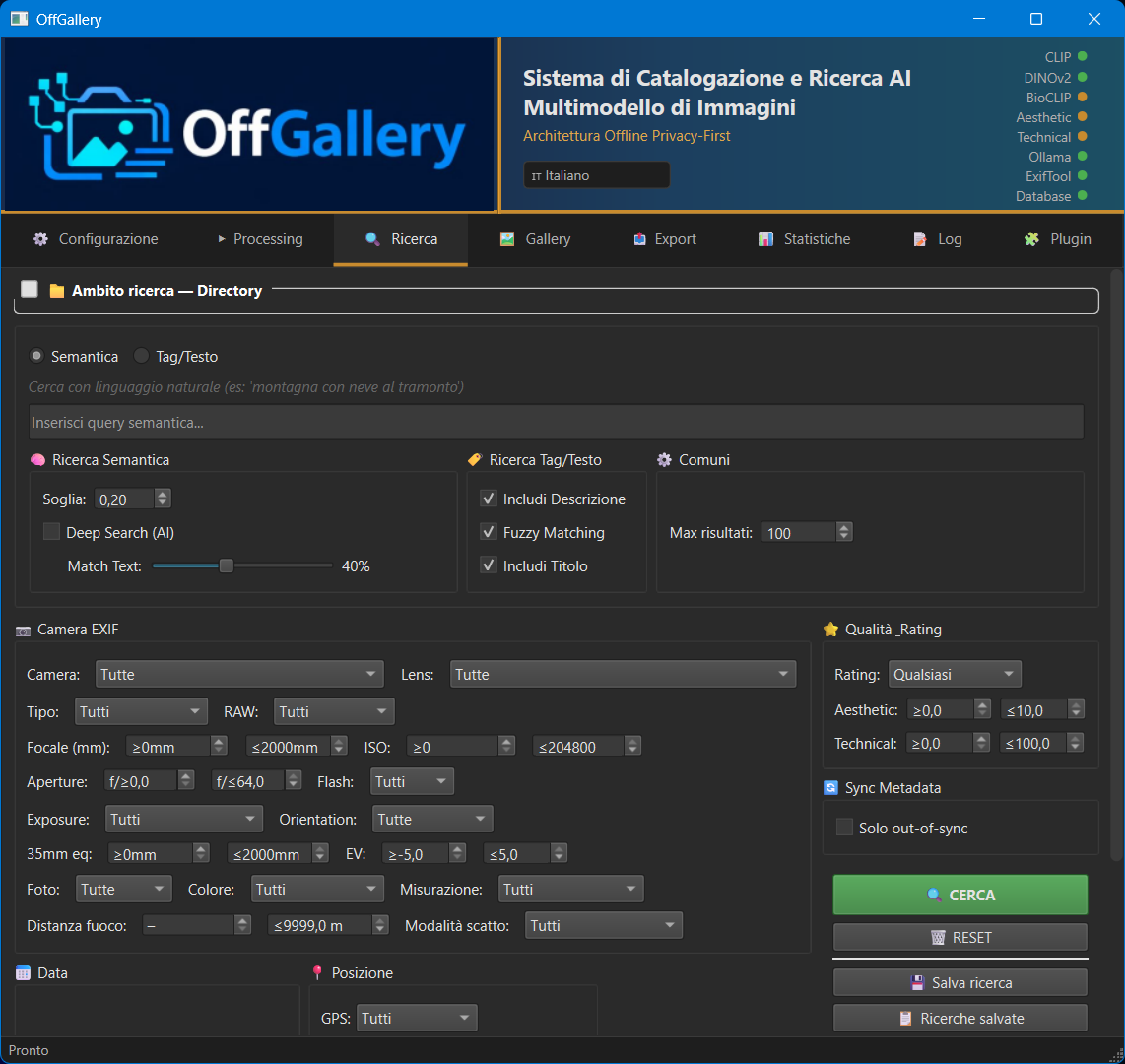
Describe the photo you are looking for and OffGallery finds it: “night views of cities”. It catalogues and searches even very large RAW archives with an AI that runs only on your computer.

  • Search by meaning, not by keywords.
  • Titles, tags, species and place generated automatically and written to XMP, compatible with Lightroom and darktable.
  • No photo ever leaves your PC. Free, open source, no subscriptions, no account.
Built for
Advanced amateurs Professional photographers Large RAW archives Workflow flexibility Lightroom compatibility & more Wildlife & botany

Your photos: why should they end up on someone else's server?

  • Cloud services catalog your images remotely. OffGallery does everything locally.
  • Let your computer handle the cataloging task.
  • With the right plugins, customize your system and add new features.

Cloud = loss of control

AI cataloging cloud services upload your images to remote servers. Your subjects, your locations, your clients — metadata extracted far from your eyes.

Subscriptions and lock-in

You pay every month for features that might disappear. The day you stop paying, you lose access to your own cataloged data.

You search by keywords, you find frustration.

Most software searches by filename or manual tags. OffGallery understands visual content: "sunset reflected on water" finds the right photos, even without keywords (tags).

The alternative exists.

Next-generation AI models run locally on consumer hardware. OffGallery orchestrates them all — SigLIP, DINOv2, BioCLIP, LLM vision — with no internet connection.

Six tools. One for every real problem.

Six core features, all running locally on your hardware.

NEW
Installation

One-click on Windows and Linux

OffGallerySetup.exe (Windows) and OffGallerySetup (Linux) install everything automatically: Miniconda, Python, libraries and AI models (~10 GB). No terminal. No manual setup.

macOS: guided script in the installer/ folder.

Privacy

100% offline and private

No photo ever uploaded online. All AI models run locally. After the first download, OffGallery works without an internet connection.*

* Except the initial AI model installation (~6.7 GB, one-time) and, if required, some plugins.

AI

Multi-model AI

SigLIP for semantic search, DINOv2 for visual similarity, BioCLIP for ~450,000 biological species, local LLM vision for automatic titles and tags, Aesthetic scorer and MUSIQ for technical and aesthetic quality.

Integration

Lightroom integration

Import .lrcat catalogs and sync tags, ratings and metadata via XMP sidecars compatible with Lightroom, Capture One and any DAM supporting the standard.

Search

Semantic search

Search by concept: "child running on the beach", "birds in flight at sunset". The query is understood and matched against the visual content of every image.

Plugins

Plugin ecosystem

Extensible architecture via plugins. Choose your LLM backend between Ollama and LM Studio, and enrich functionality with specialized modules like BioNomen.

OffGallery vs. the competition

An honest comparison, based on source code and official documentation.

Updated May 13, 2026 — Immich · digiKam · Mylio Photos

★ Exclusive features available through plugins

Some of OffGallery's most unique capabilities are available through the plugin system. Among them, the AI generator of specialized prompts for producing tags, titles and descriptions, tailored to specific needs: just describe the required properties in natural language and the AI will build an optimized prompt, replacing the standard one, to guide the Vision LLM in producing tags, titles and descriptions for the submitted images — a feature that does not exist in any other photo cataloging software.

AI generator of specialized prompts for Vision LLMs Multilingual biological common names (BioNomen) Geographic data from public databanks Swappable LLM backend (Ollama · LM Studio)
Discover all plugins →
Feature OffGallery Immich digiKam Mylio Photos
Search and Retrieval
Natural-language semantic search("sunset over the sea with a boat") ✅ SigLIP so400m (Google, 400M params, multilingual) ✅ CLIP (ViT-B/32, 151M params — EN only) ❌ keyword/tag only ⚠ Proprietary SmartTags, no free-text query
Semantic / text balance slider(SigLIP weight vs tag/description/title — "Deep Search") ✅★ EXCLUSIVE ❌ ❌ ❌
Native multilingual semantic search(SigLIP understands Italian, English and other languages — no translation needed) ✅ ❌ ❌ ❌
Deep-learning visual similarity search("find photos similar to this one") ✅ DINOv2 ✅ CLIP-based ⚠ Haar/Wavelets (not deep learning) ❌
AI quality filter(aesthetic score + technical score) ✅ ❌ ❌ ❌
Structured geographic hierarchy search(Continent › Country › Region › City) ✅ hierarchical GeOFF ⚠ by place, unstructured ⚠ GPS/map, no hierarchy ⚠ drag-and-drop map
AI and Automatic Analysis
Automatic biological taxonomy(7 levels, ~450,000 flora/fauna species — BioCLIP v2) ✅★ EXCLUSIVE ❌ ❌ ❌
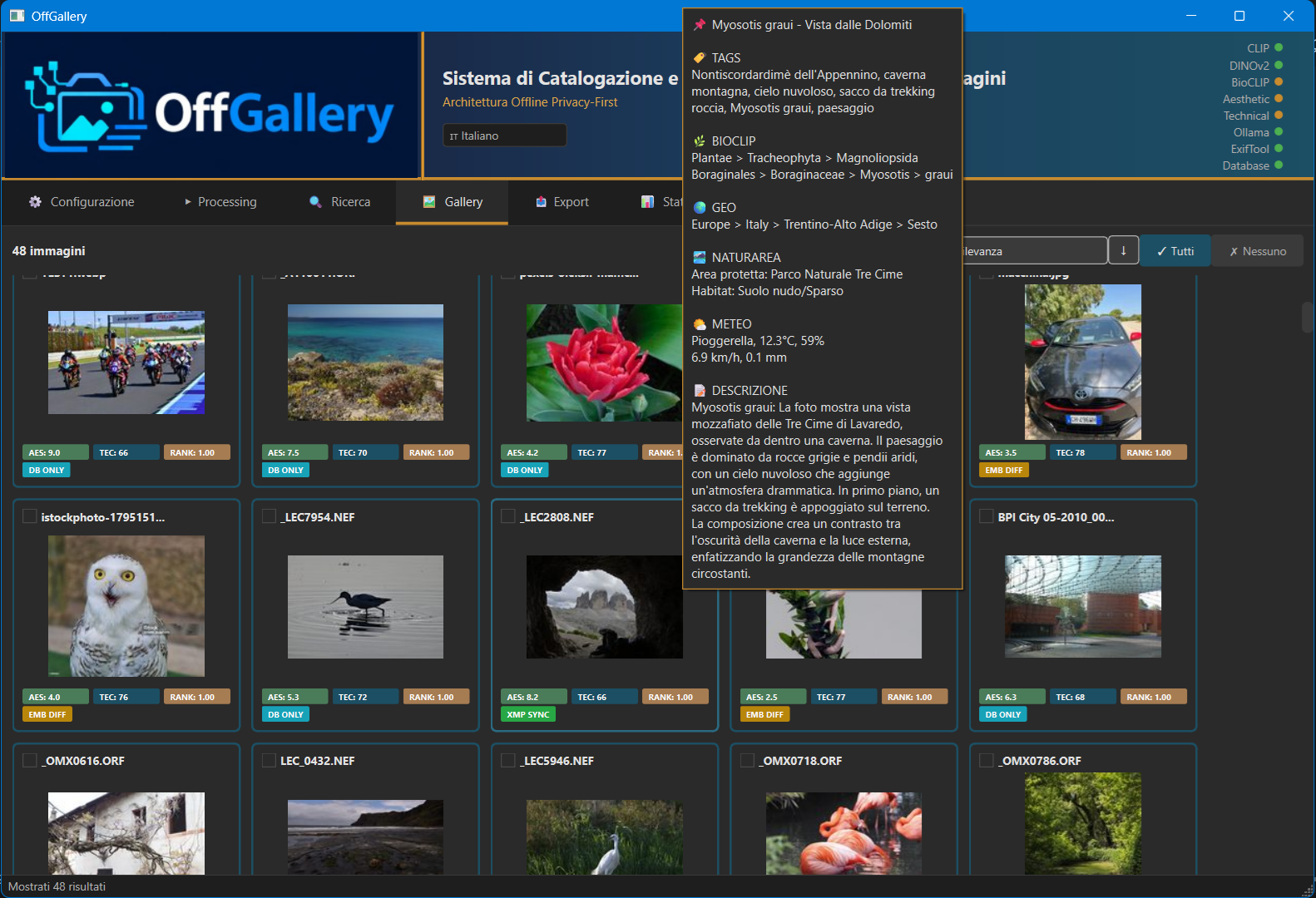
Automatic natural-language description and title(local Vision LLM via Ollama/LMStudio) ✅★ EXCLUSIVE ❌ ❌ ❌
Configurable LLM output language(tags/descriptions/titles in the user's chosen language) ✅★ EXCLUSIVE ❌ ❌ ❌
Aesthetic score + Technical score AI ✅ ❌ ❌ ❌
AI-guided culling(filter by AI score + stars + color; DINOv2 "find similar" with threshold and session window; savable presets for repeatable workflows) ✅ AI-guided ❌ ❌ ❌
Offline reverse geocoding(GPS → Continent/Country/City without external APIs) ✅ reverse_geocoder bundled ⚠ requires initial connection ⚠ uses an online service ✅ offline
Privacy and Architecture
Images never leave the device(no photo is sent to external services — some plugins may make one-off requests to public databanks to enrich metadata) ✅ ✅ self-hosted ✅ ✅ [*1]
No mandatory subscription ✅ ✅ open source ✅ open source ❌ monthly subscription
Extensible plugin architecture ✅ native plugin system ⚠ limited ✅ C++/Python ❌
Metadata and Export
XMP read/write(round-trip with Lightroom/Capture One/darktable) ✅ with selective field preservation ✅ [*2] ✅ ✅
Export with source selection independent of the gallery(gallery, or directory/entire DB — no need to search first) ✅★ EXCLUSIVE ⚠ automatic export on all files, no arbitrary selection ⚠ destination selection only ⚠ manual photo-by-photo selection
Metadata CSV export(with GPS/EXIF exclusion for privacy) ✅ ❌ ⚠ tag hierarchy only ❌
Lightroom Classic catalog import(.lrcat — rating, color label, file paths) ✅ ❌ ⚠ files only, no catalog ❌
Configuration
AI model allocation on CPU/GPU with VRAM budget(per model, VRAM slider, automatic GPU detection) ✅★ EXCLUSIVE granular per model ⚠ GPU selection, workers — no VRAM budget ⚠ OpenCL on/off ❌
Individual AI model selection(any compatible model downloaded locally, enabled from the Config tab) ✅★ EXCLUSIVE no constraints ⚠ CLIP and face recognition — no LLM ❌ models not selectable ❌
Configurable LLM backend(Ollama or LMStudio, endpoint, model, advanced parameters, output language) ✅★ EXCLUSIVE ❌ ❌ ❌
Numerically configurable search and similarity thresholds(SigLIP threshold, DINOv2 threshold, max results, fuzzy matching on/off) ✅ ⚠ duplicate threshold only ❌ ⚠ qualitative slider
✅ Present and verified ⚠ Partial or limited ❌ Absent ★ EXCLUSIVE Not present in any competitor
[*1] Mylio: local AI confirmed, but some sync features require a Mylio account.   [*2] Immich: XMP sidecar writing confirmed, but it cannot write in read-only libraries.
Plugin privacy note: images never leave the device. Some plugins may make one-off requests to public databanks (e.g. GBIF, GeoNames) to enrich metadata — never to transmit photos.
Verified sources: docs.immich.app · docs.digikam.org · manual.mylio.com · OffGallery source code.

The interface.

OffGallery — Semantic search
OffGallery — Gallery

Extend OffGallery with specialized modules.

Every plugin is auto-discovered at startup. Choose the LLM backend, activate only what you use — the others don't occupy VRAM.

LLM Backend

Ollama LLM Vision

Connect OffGallery to Ollama for natural language tag, title and description generation. Supports vision models like Qwen3-VL, LLaVA, Gemma3.

Download (for Mac)

LLM Backend

LM Studio

Use LM Studio as a local LLM server with a GUI. Ideal for managing quantized vision models.

Plugin by Riccardo Merlotti

Download (for Mac)

Nature photography

BioNomen

A grey heron identified by BioCLIP automatically becomes "airone cenerino", "héron cendré", "Graureiher" — in all XMP sidecars, offline. GBIF data bundled, taxa selectable from configuration.

Download (for Mac)

Nature photography

GeoSpecies

Refines BioCLIP classification using only the species expected at the photo's GPS location. Narrows the field from ~450,000 global species to a relevant geographic subset, increasing taxonomic accuracy. Checklists downloaded from GBIF, then used offline.

Download (for Mac)

Geographic data

GeoNames

Assigns GPS coordinates and precise geographic hierarchy (Continent › Country › Region › City) to millions of places using the GeoNames database. Replaces the built-in engine with superior accuracy for villages and hamlets.

Download (for Mac)

Geographic data

NaturArea

Identifies the protected area (WDPA/UNEP) and habitat type (ESA WorldCover) for each GPS-tagged photo. Filter by habitat or protected area directly from the search panel.

Download (for Mac)

Geographic data

Weather Context

Retrieves historical weather conditions at the time of the shot via Open-Meteo (temperature, wind, rain, snow…). Conditions are searchable from the search panel and visible on gallery image cards.

Download (for Mac)

LLM Backend

Contesto Prompt

Injects a custom CONTEXT block into the Vision-Language prompt to steer the model towards the archive's photographic domain. Built-in presets (nature, landscape, astro, macro, underwater, reportage…) and custom presets generated by the local model.

Download (for Mac)

All plugins are free.

Windows and Linux: install the plugins directly from OffGallery's graphical installer, in the «Plugins» section.
macOS: download the plugin zip from the «Download» button on its card above, then extract the folder into plugins/ in your OffGallery installation. On first run each plugin downloads its own data (maps, databases) from its configuration.

Want to know exactly what it does?

A page with every feature documented — models, formats, search filters, metadata.

Technical documentation